How to add JavaScript to a project
You can view a boilerplate template here: https://github.com/mmagnusen/boilerplate
- Clone the project
- Open your preferred web browser
- Click on file > open file
- Find the location of the project we've just cloned and double-click on the index.html file
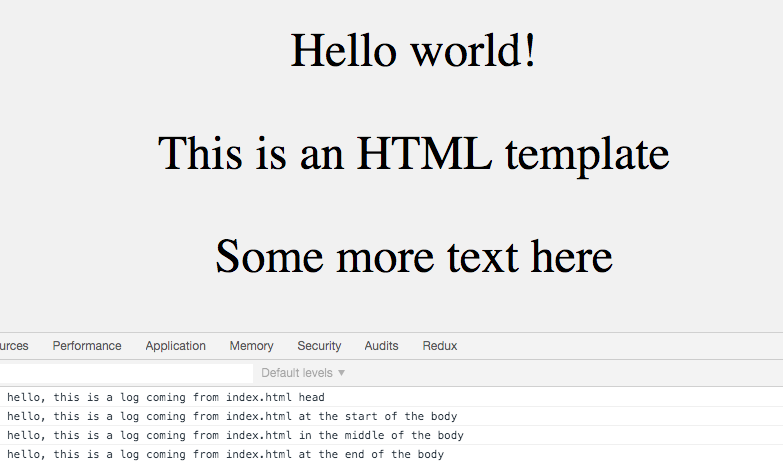
- If you open the inspector, you should be able to see four console logs
Let's find out where these logs are coming from.
Script Tags
Adding JavaScript code can only be done using a script tag, there are two ways we can add these tags:
- Write code directly within script tags
- Script tag in head
- Script tag in body
- Link to seperate JavaScript file
Write your JavaScript code directly within the script tags
Script tag in head
Lines 11-13: This is where we are seeing console.log('hello, this is a log coming from index.html head')
Script tag in body
This can be anywhere in the body of the html
- At the start of the body - lines 17-19: console.log('hello, this is a log coming from index.html at the start of the body')
- Anywhere in the middle of the body - lines 24-26: console.log('hello, this is a log coming from index.html in the middle of the body')
- At the end of the body: lines 30-32: console.log('hello, this is a log coming from index.html at the end of the body')
<!doctypehtml><htmllang="en"><head><metacharset="utf-8"><title>BoilerplateTemplate</title><metaname="viewport"content="width=device-width,initial-scale=1,shrink-to-fit=no"><metaname="description"content="HTMLBoilerplateTemplate"><metaname="author"content="Clearli"><linkrel="stylesheet"href="styles.css"><script>console.log('hello,thisisalogcomingfromindex.htmlhead')</script></head><body><script>console.log('hello,thisisalogcomingfromindex.htmlatthestartofthebody')</script><p>Helloworld!</p><p>ThisisanHTMLtemplate</p><script>console.log('hello,thisisalogcomingfromindex.htmlinthemiddleofthebody')</script><p>Somemoretexthere</p><script>console.log('hello,thisisalogcomingfromindex.htmlattheendofthebody')</script></body></html>The better way is to put your JavaScript code inside a separate file, and link to it from your index file.
Replace the code in index.html with:
<!doctypehtml><htmllang="en"><head><metacharset="utf-8"><title>BoilerplateTemplate</title><metaname="viewport"content="width=device-width,initial-scale=1,shrink-to-fit=no"><metaname="description"content="HTMLBoilerplateTemplate"><metaname="author"content="Clearli"><linkrel="stylesheet"href="styles.css"><scriptsrc="headJavaScript.js"></script></head><body><p>Helloworld!</p><p>ThisisanHTMLtemplate</p><p>Somemoretexthere</p><scriptsrc="mainJavaScript.js"></script></body></html>The link to the separate file can be put in the head (line 11) or the body (line 21) of the html.
Our JavaScript code is contained within files called headJavaScript.js and mainJavaScript.jsso we provide the name and path to these files as the source of our scripts.
Summary
You can place a script tag in the head, in the body or both.
You can also add a link to a separate JavaScript file, either on its own or use in combination with script tags in the head and body.
Best practice is to place your JavaScript code in a separate file, because it makes your code easier to read and work with. This should be put in the head, so the JavaScript is loaded by the browser ready for any code which may rely upon it on initial load.